Create PDF Copy
There are numerous advantages of working with PDF files over other types of text or image files like Tiff,JPEG, etc. PDF files are ideal for sharing information, as they can be opened on any operating system (almost all computers today have a PDF reader installed). They always appear the same and also support embedded OCR text. Looking at these benefits, Docsvault includes a Image to PDF conversion feature for customers who have legacy scan data in the image format.
Image to PDF conversion feature will be available on the following file extensions-
".WMF", ".TIF", ".TIFF", ".JPEG", ".JPG", ".BMP", ".GIF", ".PNG", ".JBIG2", ".EXR", ".J2K", ".JP2", ".PBM", ".TGA", ".WBMP", ".WMF", ".XMP", ".ICO", ".JPE", ".JFIF"
Steps to convert image to PDF
•Select one or more files to be converted to PDF
• Right-click on any selected file and then select 'Create PDF Copy’
• Docsvault will automatically convert all selected files to PDF files and place them in the same folder using the same file name.
The source file remains intact.
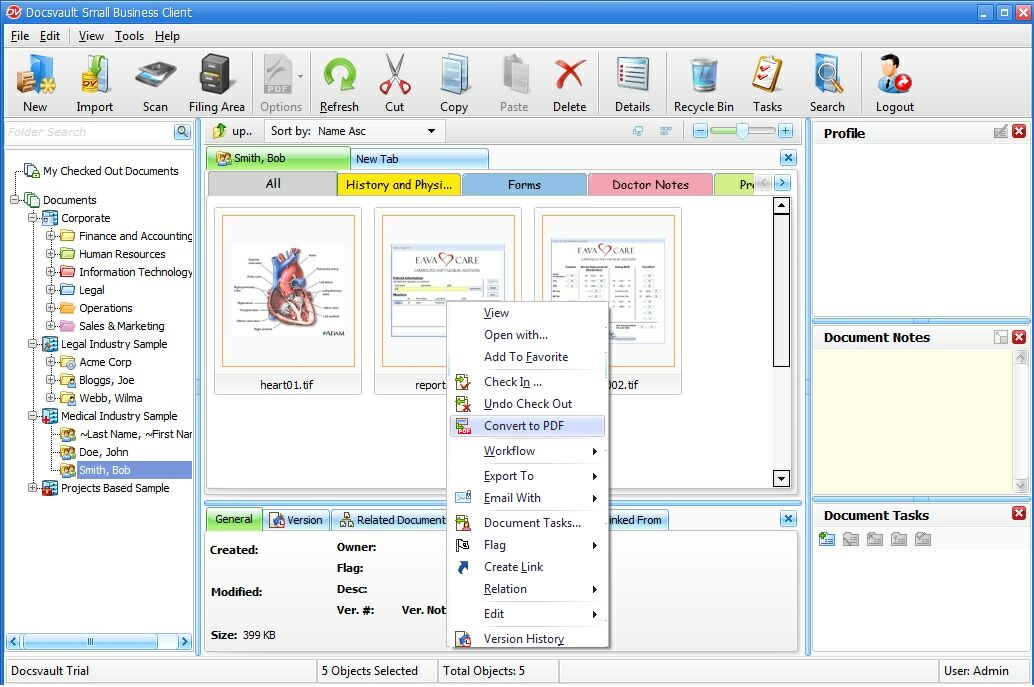 Convert Image to PDF |
•If the image file is TIFF and if the OCR TIFF files option is enabled on the server side, the OCR process will automatically convert the newly generated PDF files into searchable PDF files. A searchable PDF document will appear in the search results if any of the search criteria matches its text.
|
