Using various criteria for the automatic transaction:
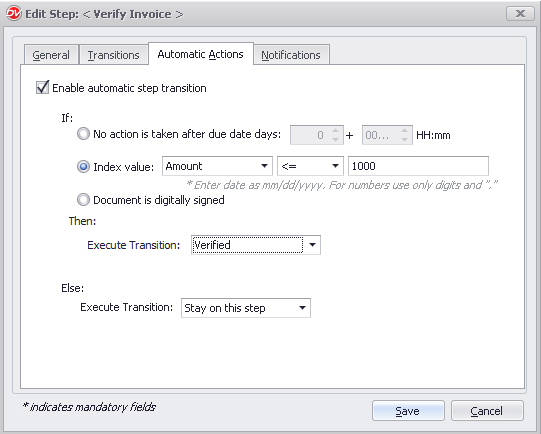
You can define an automatic transition between the current step and the next to take place when certain conditions are fulfilled. For example, Execute Transition 'Verified' if index value 'Amount' is less than '1000' else 'Stay on this step' or if no action is performed by participants after 2 days of the due date cancel a workflow.
(if) - Define a condition that must be met before the below action is performed
▪No action is taken after due date days n: Specify the number of grace days after due date for the above action to trigger
▪Index value: Specify and index value condition to be satisfied for the above action to trigger
▪Document is digitally signed: Select this option to automatically perform the action when the document is digitally signed
(Then) - Perform one of the following action if the above condition is satisfied
▪Execute Transition: Select the transition to automatically move the workflow to if the specified condition is satisfied
(Else) - Perform the specified transition if the above condition is not satisfied. The else option is only available for Index Value condition is selected above in the IF clause.
▪Execute Transition: Select the transition to perform if the specified condition is not satisfied
 |