|
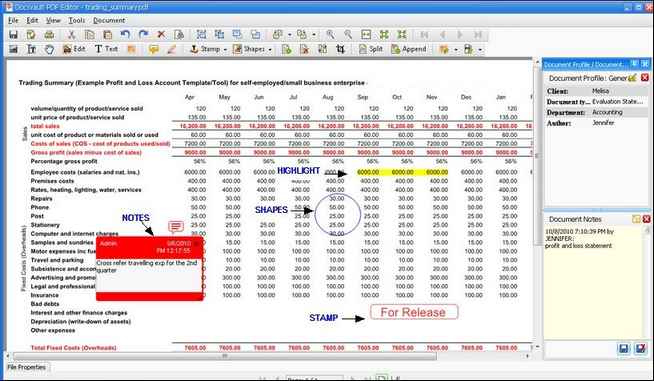
Features of Docsvault PDF Editor
| • | Open, view and print PDF documents |
| • | Edit and add text and images to PDF documents |
| • | Add comments and comment text with customized stamps, notes, shapes and text boxes and share them in PDF Editor |
| • | Select the text or image and snapshot an area to copy to the clipboard |
| • | Extract OCR'd text from PDFs |
| • | Append, merge, split, delete, reorder, crop and extract pages from a PDF document |
|
Docsvault PDF Editor
|
|
Editing a PDF document
| • | Select the document to be edited. |
| • | From the File menu, select Check Out Or |
From the list view panel, right click on the document and click on Or
From the Tool bar, select PDF Options > Advance Edit
| • | This will check out the document. You can open the document in the associated application for editing or you can choose the appropriate program from the list. |
 Note: Note:
| • | You can set Docsvault's inbuilt PDF editor as default editor by configuring it in Tool > Options > Check In/Out. |
|
To add and insert pages to an existing PDF document, use the Append or Merge Files feature.
Editing a document by using Append or Merges feature
| • | Right click on the document where you want to append or merge the page from the PDF files and then |
| • | Select PDF options > Append/Merge Files. |
| • | The Append or Merge Files dialog box will pop up |

|
Append or Merge Files dialog box
|
| • | Set the files from where pages are to be added |
| • | Select the 'Page Range' to append. |
| • | Select the 'Insert position'. |
Note:
| • | You can append or merge to only PDF files. |
|
Editing a document by using Split or Extract Pages feature
| • | Right click on the document where you want to append or merge the page from the PDF files and then |
| • | Select PDF options > Split or Extract Pages. |
| • | Under Extract Section, specify the pages to extract. |
| • | Provide the new File name. |
| • | Select the destination, where you want to save the extract pages in Docsvault and click the OK button. |
| • | In Import files and folder box, enter the description and select an appropriate Profile with predefined settings for the new PDF file. For more information see Assigning Profile to Documents. |

|
Extract Pages
|
You can also Split the pdf by specifying the (n) page no. from where the file has to be split into a new file.
Page url:
http://www.docsvault.com/online-help/small-business/index.html?docsvault_pdf_editor.html
|


