|
The Cabinet in Docsvault is the highest level of the hierarchical tree. Similar to your physical filing system the hierarchical tree consists of a Cabinets containing Folders that contain Files.
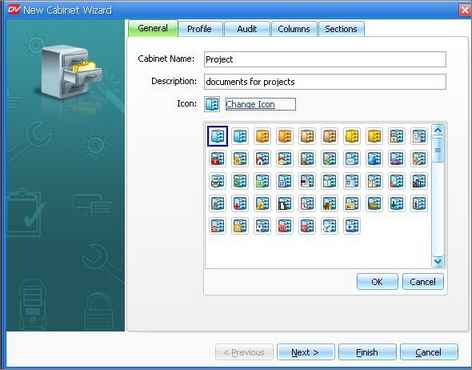
Creating Cabinet using Cabinet wizard helps you to create a new cabinet and systematically assign proper settings like profiles, audit, folder sections etc.
| • | Select Docsvault from the tree view panel. |
| • | Right-click on Docsvault from the tree view panel to display the popup menu. Click on |

|
Creating a new cabinet
|
| • | In Cabinet Wizard setup, enter the Cabinet Name and Description and select an icon of your choice. |
| • | Clicking on the Next button will take you to individual tab where you can set up default profiles, mark events to be logged for activities, customize the folder sections and the way file attributes should be displayed in Details view mode under this cabinet. |
| • | Then click on Finish button to create a cabinet. |
Page url:
http://www.docsvault.com/online-help/professional/index.html?create_new_cabinet.html
|