|
Flagging a Cabinet/Folder/File
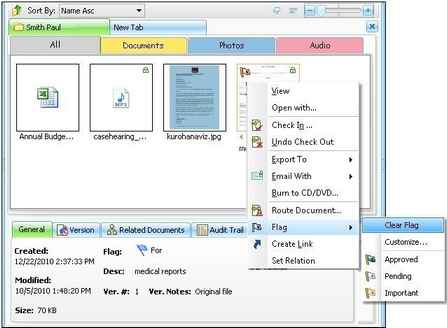
Flagging an item adds a flag icon to it. You can use flags to remind yourself to follow up on an issue, to indicate a request for someone else or take action related to it at a later time. You can see the flagged item in the list view panel.
To assign a flag
| • | Select the cabinet, folder or the file you wish to flag from the list view panel. |
| • | Right click and then point to Flag. This will open a list of available flags that can be used to flag the selected items. |
| • | Select the appropriate flag from the list. |
| • | Note that the List view panel will now display the flag, as shown below. |
Note:
| • | You can assign from the default flag listing or create a new flag with your choice. For more information, see Customize Flags. |
| • | You can also assign a flag to multiple files/folders/cabinets at the same time. Select the items, and then right click and select the Flag. |
|

|
Assigning a flag
|
If the file is flagged, its information will be displayed in the status bar when selected.
Page url:
http://www.docsvault.com/online-help/professional/index.html?assigning_a_flag.html
|