Searching Archived Documents
Easily locate archived documents using the search box or by navigating directly to the Archive folder. Archived documents can be searched independently, improving search efficiency and preventing clutter in your active database.
Only users of the administrators group can see and navigate the Archive cabinet by default. Normal users may only search for items in archive from the normal search interface.
Set user and group rights in the "Archive Access" security template to allow them to see and navigate this special cabinet. Note that the access to documents within the Archive cabinet are still controlled by the original user permissions on those documents. |

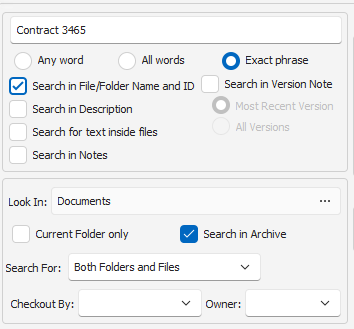
To Search Archived Documents:
•Enable the Option: Check the "Search in Archive" option in both Quick Search, Profile Search and Advanced Search modes.
•Enter Search Criteria: Input your search terms or filters.
•View Results: The search results will display archived documents that match your criteria.
Additionally, you can also generate custom reports based on the archived files.