Monitoring and Auditing Archiving and Deleting Actions
Monitoring and auditing archiving and deleting actions is essential to ensure data integrity, compliance, and security.
Audit Trail
The system automatically records a detailed audit trail for all archiving and deleting actions, including:
•File/Folder: Name of the document or folder affected.
•User: The user who initiated that action
•Event Date: The time stamp of the action.
•Event: The type of action performed (e.g., archive, delete, restore)
Administrator or authorized users can query these records to trace archive related events.
Viewing Logs for Archived and Deleted Records
Administrators can view detailed logs of all archived and deleted records directly from the Administration menu. These logs provide a clear record of documents that were:
•Archived manually or automatically.
•Deleted as part of a predefined retention or archival policy.
This feature ensures transparency, accountability, and compliance tracking for document lifecycle events.
Accessing the Logs
•Open the Administrative menu in Docsvault.
•Select Archive Delete Policy Log.
•Filtering by Duration: Use the Duration dropdown to choose a time range:
oLast 7 days
oLast 30 days
oLast 90 days
oLast year
oAll records
•Each log entry contains:
oFile/Folder: Name of the document or folder affected.
oUser Name: The user responsible for the action.
oDate-Time: When the archival or deletion occurred.
oEvent: Type of action (archived or deleted).
oLocation: Where the document or folder was stored before the action.
•Using Filters: You can refine your search results in two ways:
oFind Panel – Enter keywords to search across the displayed records.
oColumn Filters – Click the filter icon in a column header to display only matching data (e.g., filter by a specific username or event type).
You can even export displayed records in various file formats using the blue save button in the left bottom corner of the form.
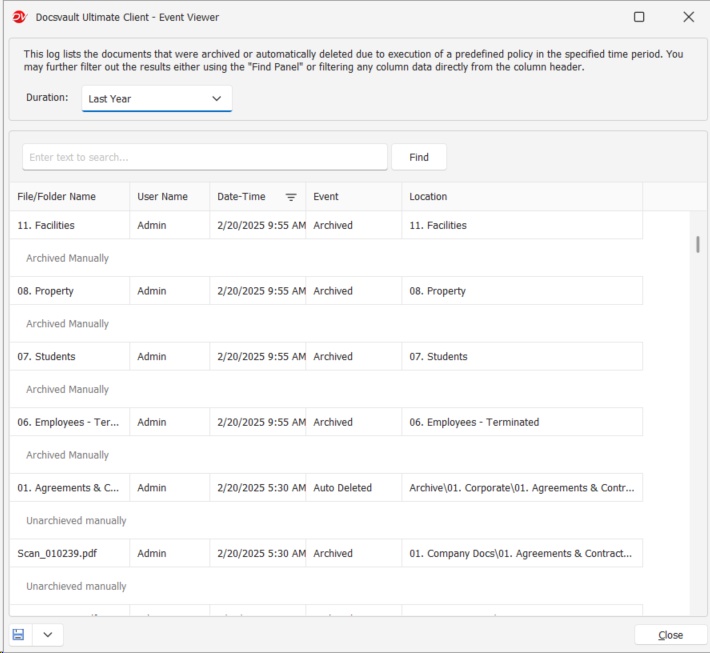 Archive Delete Logs |
Best Practices
•Regularly review logs to ensure compliance with your organization’s retention policies.
•Use filters to quickly locate actions by specific users or within certain timeframes.
•Export filtered results for reporting or audit purposes when necessary.