Email Alerts
This node will allow you to enable and configure the email alert system.
 |
Email Alerts |
Enable Email Alerts
•Select Enable Email Alerts checkbox to enable the email alerts system
•Set the frequency at which the alert system should check for new emails queued and waiting to be sent out
Client Side Emails
•In Client Side Alerts, select the checkbox to allow the user to send quick emails and to set email alerts on document and folder for the events such as: View, Import or Scan, Copy, Export, Check Outs,Check Ins, Audit Settings Change, Profile or Index values change, Security Change, Deletes, Restore from Recycle Bin, Overwrite, etc.
Server Side Alerts
•In Server Side Alerts, enter the email addresses that will receive email alerts for the following events occurred on the server side:
▪Schedule Backup Status: select this checkbox to monitor this event and send the email alert to the above mentioned email address when backup is triggered
▪On failure only: select this checkbox if you want to receive an alert email only if the backup fails
▪When any vital services is unavailable: select this checkbox if you want to be notified by email on failure of important Docsvault services such as Docsvault OCR service, Docsvault Server service and Database service
▪Select the checkbox next to When any user exports... and specify the number of document in the text box to set an email alert when any user tries to export more than specified number of document at a time.
Email Broadcast
Broadcast e-mails are an effective way to communicate with Docsvault users in your organization. Docsvault allows you to send bulk e-mails to Docsvault users. For instance, you can send update notification e-mails to everyone making them aware of new or changed content, system downtime or system usage tips.
This log provides a checklist for troubleshooting possible causes for email failure send through Docsvault system.
From the Server Manager dialog on the server side, see Email Log under Alerts > Email Alerts node
OR
From the Administration Menu in Docsvault client click on Email Failure Log
Logs contain data such as:
•The email address of each email sender and recipients
•The date and time each email was sent
•An error description associated with each email.
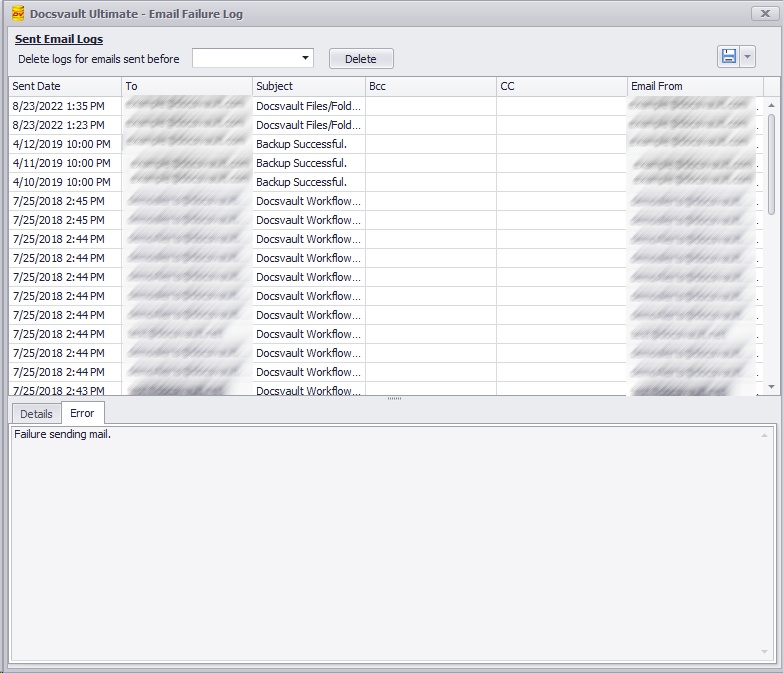 |
•You can use email logs to troubleshoot encountered errors.
•You can delete and purge logs for emails sent before specific date. Specify the date and click Delete button.
•You can export and save an email log in various formats like pdf, excel, csv, etc.