|
Profiles and Indexes |

  
|
|
Profiles and Indexes |
|
|
Indexes are custom fields that you can create to assign more information to a document or folder. Profiles are simply a group relevant indexes suitable for certain purpose. For example, an 'Account Payable' profile could have index fields like Vendor, Invoice Date, Amount, Due Date, etc.
Docsvault displays the entered document profile information in the right panel when any file or folder is selected in the file list. This gives a quick overall picture about the type and purpose of any selected document within Docsvault. However this is not all. You can search for these index fields to quickly get to the document you are looking for.
Indexes Document index is a set of 'Name -Value' pair. Let us understand by example.
Documents can be of many types: Legal Notice, Presentation, Contract, Agreement, Invoice, Memo, Blue Print, Letter, Report, Chart, etc.
To assign a particular document type to any document we create a index field called 'Document Type'
Thus we can denote, the 'Name-Value' pair as:
Types of indexes in Docsvault Docsvault allows you to create unlimited number of indexes
In general, Docsvault provides two types of indexes:
Static: For a static index, you can have a list of predefined values from which the user can select a value at the time of assigning values to any document. User Defined: User defined indexes do not have predefined list of values and the user needs to input the value for such index during importing document or when editing any profile. Example 'Notes, Invoice Date, and End Date' are the indexes whose values need to be assigned as and when new documents are imported into the repository. User Defined indexes are of three types:
Profiles We can assign several indexes to a document which add related information about that document.
If one or more such indexes are grouped and given a purposeful name, then such a group is called a Document Profile. In Docsvault, you actually assign a profile instead of multiple indexes to a document or folder. Each profile will contain one or more indexes.
Let us look at an example of Profiles and indexes and see how significantly it enhances the information about the document.
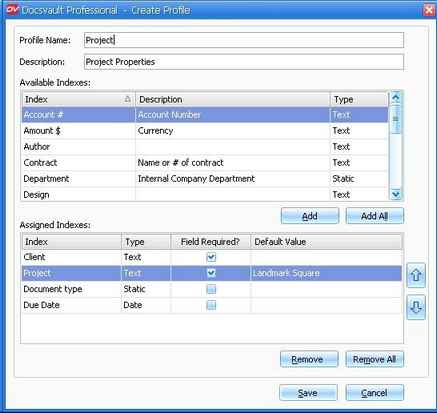
You can mandate entry of any important index field, ex. Project, so that has to be entered by users while importing a document. To do this simply click the 'Field Required?' checkbox next to the field name. You can also enter the 'Default value' for a field (ex. Project: Landmark Square or starting with prefix: PRJ/).
The values for these indexes can be assigned to documents or folders in their respective 'Document Profile' panel on the right side in main window of the Docsvault client. See the client manual for more information on how to assign and use profile values.
Page url: http://www.docsvault.com/online-help/professional/index.html?profile_prop.html |