|
After installing the Office integration, Docsvault places a Docsvault menu toolbar in Office applications that when clicked will automatically open Docsvault and allow you to save documents directly to a Docsvault folder. You can add MS Office documents directly from an Office application like Word, Excel and PowerPoint to a Docsvault folder.
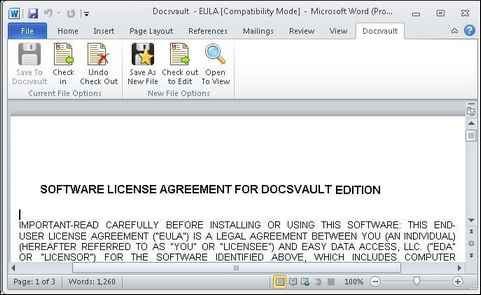
The Docsvault Plugins presented below are available for MS Office 2007 and Office 2010 (32 bit). The following functions can be access from the Docsvault toolbar in Office applications.
| • | You can checkout a document for reading or editing directly from the Docsvault using Open to View or Check out to Edit respectively. |
| • | Save to Docsvault is the handiest way to save a new or edited document to Docsvault. |
| • | The Check in function closes the current document and will save the changes back to Docsvault. If the Check in function is performed on a document that has been edited, all changes made after the document was checked out will be saved. |
| • | The Undo Checkout function closes the current document and cancels its checkout without saving changes. If the Undo Checkout function is performed on a document that has been edited, all changes made after the document was checked out will be lost. |
| • | The Save As New file function allows you to save the file as new file in Docsvault. |
|
MS Office Integration
|
 Note: Note:
| • | The default path for check out folder can be set on the computer from Options. For more information, see 'Check In / Check Out' in 'Options'. |
| • | You can save an email with an attachment from Outlook to Docsvault as .msg file. When the email document is opened from Docsvault it will open up in Outlook and will display both the message and the attachments. You can also save attachments only if that is desired. |
|
Page url:
http://www.docsvault.com/online-help/professional/index.html?adding_document_from_microsoft.html
|


